Introduction
Your admit card (also called a hall ticket or call letter) is the single most important document for appearing in any government exam — without it, you will not be permitted entry into the examination centre, regardless of how well you've prepared. This guide walks you through exactly how to download your government exam admit card 2026, covers the common mistakes that trip up first-time candidates, and explains what to do if you run into download problems close to your exam date.
Every recruiting body (SSC, UPSC, IBPS, RRB, State PSCs, and others) follows a broadly similar admit card download process, though the exact website and portal differ by organisation — this guide covers the universal steps that apply across nearly every government exam.
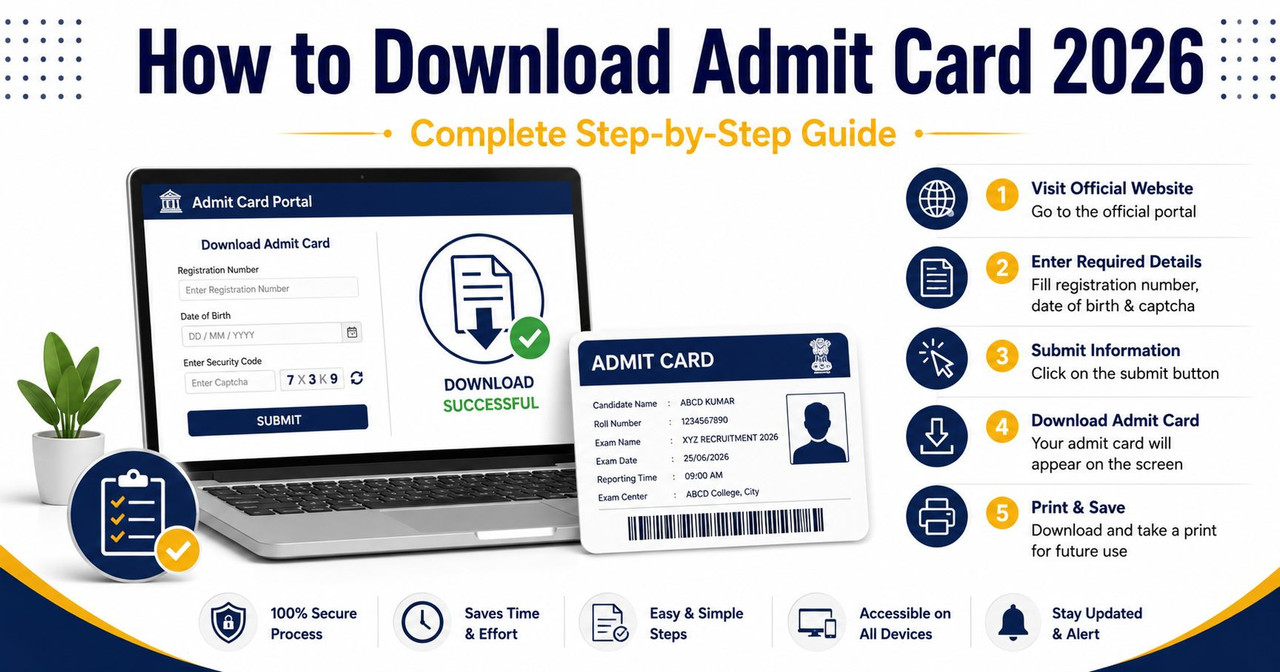
Step-by-Step: How to Download Your Admit Card
Step 1: Visit the Official Recruiting Body's Website Always download your admit card only from the official website of the conducting authority (e.g., ssc.gov.in for SSC exams, ibps.in for banking exams, the relevant RRB regional website for railway exams). Never use third-party or aggregator websites for downloading — these are not authorised sources and may not have your correct, updated admit card.
Step 2: Locate the "Admit Card" or "Hall Ticket" Link Look for a dedicated "Admit Card," "Call Letter," or "Hall Ticket" section, usually found on the homepage or under a "Candidate Login" / "Recruitment" tab. Recruiting bodies typically announce the admit card release date well in advance through official notifications and social media channels.
Step 3: Enter Your Login Credentials You will generally need one of the following combinations to access your admit card:
- Registration Number/Roll Number + Date of Birth
- Registration Number + Password (the one created during application)
- Application Number + Password/PIN
Keep your registration details safely noted from the time you applied, since losing them can complicate the admit card download process later.
Step 4: Verify Your Details on the Admit Card Once downloaded, carefully check every field on your admit card:
- Your name (spelled exactly as per your official documents)
- Photograph and signature (should match what you uploaded)
- Roll number and registration number
- Exam date, reporting time, and exam centre address
- Any specific instructions listed (documents to carry, dress code, prohibited items)
Step 5: Download and Print in Color (or as Specified) Most recruiting bodies require the admit card to be printed clearly, often in color, on A4 size paper. Save a digital copy on your phone as backup, but always carry the physical printed copy, since most exam centres do not accept only a mobile screen display.
Step 6: Check for Additional Required Documents Read the admit card carefully for any additional document requirements — a valid original photo ID (Aadhaar, PAN, Voter ID, Driving Licence, or Passport), passport-size photographs, or category/PwBD certificates, all of which are commonly required alongside the admit card itself for entry.
Downloading Admit Cards via DigiLocker
Several recruiting bodies, including SSC and some state boards, have started issuing admit cards through DigiLocker as an additional secure channel. If this option is available:
- Download the DigiLocker app or visit digilocker.gov.in
- Log in using your Aadhaar-linked mobile number
- Search for the relevant issuer (e.g., SSC) under "Search Documents"
- Locate and download your admit card directly from your DigiLocker account
This method provides an added layer of verification, since documents in DigiLocker are digitally signed and considered valid originals.
Common Mistakes to Avoid
- Waiting until the last day: Server load is heaviest right before the exam date, when lakhs of candidates try to download simultaneously — download your admit card as soon as it's released, not on the final day
- Using unofficial websites: Some aggregator sites host outdated or incorrect admit card links — always verify you're on the correct official domain before entering your credentials
- Not checking details carefully: Errors in name, photograph, or exam centre should be reported to the recruiting body immediately through the official correction/grievance channel, not ignored
- Printing in poor quality: A blurry or faded printout can cause issues at the exam centre — ensure your printer settings produce a clear, legible copy
- Losing registration credentials: Keep your registration number, application number, and password saved securely from the day you apply, not just when the admit card is about to release
What to Do If Your Admit Card Doesn't Download
- Try during off-peak hours: If the official website is overloaded, try accessing it very early in the morning or late at night when traffic is lower
- Clear browser cache or try a different browser: Sometimes a simple browser switch resolves loading issues
- Check for a helpline or grievance portal: Nearly every recruiting body publishes a dedicated helpline number or email for admit card issues — use this rather than waiting indefinitely
- Visit a nearby cyber café or seek help if needed: If your personal internet connection is unreliable, especially in areas with poor connectivity, a cyber café with a stable connection can help you download in time
- Never wait until exam day: If you're facing persistent download issues, escalate to the recruiting body's helpline at least a few days before the exam, not on the exam day itself
Get Instant Government Job Alerts
Never miss a notification, admit card, or result. Join our free channels for daily sarkari naukri updates delivered straight to your phone:
- 💬 WhatsApp Channel: Join Now
- 📢 Telegram Channel: Join @govtjobsiojobs

Leave a Reply
Be the first to comment.